Wednesday, 24 July 2024

DBMS_OPTIM_BUNDLE : Optimizer Fixes in DBRU

Starting 12.2, Optimizer fixes included in the RUs are disabled by default.

To get the complete list of fixes - Oracle has introduced a package called dbms_optim_bundle. Since the RUs are cumulative in nature, this package would list the optimizer fixes that Oracle included in every RU. 

Here is the output from my 19.12 database. I can see that there are 13 fixes in 19.12 ( call it a RU 12 or July 2021 bundle), 45 fixes on 19.11 and so on. In total there are 104 fixes and all of them are disabled by default.

SQL> exec dbms_optim_bundle.getBugsforBundle(210720);


19.4.0.0.190719DBRU:

    Bug: 29331066,  fix_controls: 29331066


19.5.0.0.191015DBRU:

    Bug: 28965084,  fix_controls: 28965084

    Bug: 28776811,  fix_controls: 28776811

    Bug: 28498976,  fix_controls: 28498976

    Bug: 28567417,  fix_controls: 28567417

    Bug: 28558645,  fix_controls: 28558645

    Bug: 29132869,  fix_controls: 29132869

    Bug: 29450812,  fix_controls: 29450812


19.7.0.0.200414DBRU:

    Bug: 29687220,  fix_controls: 29687220

    Bug: 29939400,  fix_controls: 29939400

    Bug: 30232638,  fix_controls: 30232638

    Bug: 30001331,  fix_controls: 30001331


19.8.0.0.200714DBRU:

    Bug: 29304314,  fix_controls: 29304314

    Bug: 29930457,  fix_controls: 29930457

    Bug: 30519188,  fix_controls: 30028663

    Bug: 28144569,  fix_controls: 28144569

    Bug: 28776431,  fix_controls: 28776431


19.9.0.0.201020DBRU:

    Bug: 27261477,  fix_controls: 27261477, 31069997, 31077481

    Bug: 28602253,  fix_controls: 28602253

    Bug: 31486557,  fix_controls: 29653132

    Bug: 29937655,  fix_controls: 29937655

    Bug: 30347410,  fix_controls: 30347410

    Bug: 30602828,  fix_controls: 30602828

    Bug: 30896685,  fix_controls: 30896685


19.10.0.0.210119DBRU:

    Bug: 29487407,  fix_controls: 29487407

    Bug: 30998035,  fix_controls: 30998035

    Bug: 30786641,  fix_controls: 30786641

    Bug: 31444353,  fix_controls: 31444353

    Bug: 30486896,  fix_controls: 30486896

    Bug: 28999046,  fix_controls: 28999046

    Bug: 30902655,  fix_controls: 30902655

    Bug: 30681521,  fix_controls: 30681521

    Bug: 29302565,  fix_controls: 29302565

    Bug: 30972817,  fix_controls: 30972817

    Bug: 30222669,  fix_controls: 30222669

    Bug: 31668694,  fix_controls: 31668694

    Bug: 31001490,  fix_controls: 31001490

    Bug: 30198239,  fix_controls: 30198239

    Bug: 30980115,  fix_controls: 30980115

    Bug: 30616738,  fix_controls: 30616738

    Bug: 31895670,  fix_controls: 31895670

    Bug: 19138896,  fix_controls: 19138896

    Bug: 31376708,  fix_controls: 31670824

    Bug: 30564898,  fix_controls: 9876287, 30564898

    Bug: 32234161,  fix_controls: 32075777

    Bug: 30842277,  fix_controls: 30570982


19.11.0.0.210420DBRU:

    Bug: 32037237,  fix_controls: 32037237

    Bug: 30927440,  fix_controls: 30927440

    Bug: 31788104,  fix_controls: 30822446

    Bug: 24561942,  fix_controls: 24561942

    Bug: 31625959,  fix_controls: 31625959

    Bug: 31976303,  fix_controls: 31579233

    Bug: 29696242,  fix_controls: 29696242

    Bug: 31626438,  fix_controls: 31626438

    Bug: 30228422,  fix_controls: 30228422

    Bug: 32122574,  fix_controls: 17295505

    Bug: 29725425,  fix_controls: 29725425

    Bug: 30618230,  fix_controls: 30618230

    Bug: 30008456,  fix_controls: 30008456

    Bug: 30537403,  fix_controls: 30537403

    Bug: 30235878,  fix_controls: 30235878

    Bug: 30646077,  fix_controls: 30646077

    Bug: 29657973,  fix_controls: 29657973

    Bug: 30527198,  fix_controls: 29712727

    Bug: 20922160,  fix_controls: 20922160

    Bug: 30006705,  fix_controls: 30006705

    Bug: 29463553,  fix_controls: 29463553

    Bug: 30751171,  fix_controls: 30751171

    Bug: 9,  fix_controls: 31009032

    Bug: 30207519,  fix_controls: 30063629, 30207519

    Bug: 31517502,  fix_controls: 31517502

    Bug: 30617002,  fix_controls: 30617002

    Bug: 30483217,  fix_controls: 30483217

    Bug: 30235691,  fix_controls: 30235691

    Bug: 30568514,  fix_controls: 30568514

    Bug: 28414968,  fix_controls: 28414968

    Bug: 32014520,  fix_controls: 32014520

    Bug: 30249927,  fix_controls: 30249927

    Bug: 31580374,  fix_controls: 31580374

    Bug: 29590666,  fix_controls: 29590666

    Bug: 29435966,  fix_controls: 29435966

    Bug: 29867728,  fix_controls: 28173995, 29867728

    Bug: 30776676,  fix_controls: 30776676

    Bug: 26577716,  fix_controls: 26577716

    Bug: 30470947,  fix_controls: 30470947

    Bug: 30979701,  fix_controls: 30979701

    Bug: 31435308,  fix_controls: 30483184, 31001295

    Bug: 31191224,  fix_controls: 31191224

    Bug: 31974424,  fix_controls: 31974424

    Bug: 29385774,  fix_controls: 29385774

    Bug: 28234255,  fix_controls: 28234255


19.12.0.0.210720DBRU:

    Bug: 31459242,  fix_controls: 31459242

    Bug: 31082719,  fix_controls: 31082719

    Bug: 28708585,  fix_controls: 28708585

    Bug: 31821701,  fix_controls: 31821701

    Bug: 32107621,  fix_controls: 32107621

    Bug: 26758837,  fix_controls: 26758837

    Bug: 31558194,  fix_controls: 31558194

    Bug: 30781970,  fix_controls: 30781970

    Bug: 30142527,  fix_controls: 30142527

    Bug: 31143146,  fix_controls: 31143146

    Bug: 31961578,  fix_controls: 31961578

    Bug: 31496840,  fix_controls: 31496840

    Bug: 22387320,  fix_controls: 22387320


To enable these fixes, you run 


SQL> execute dbms_optim_bundle.enable_optim_fixes('ON','BOTH', 'YES')


This will enable all the fixes mentioned above. With dbms_optim_bundle, you do not have an option to enable a particular fix. However, if you want to enable a particular fix, you could do it manually through the _fix_control parameter.


SQL> alter system set "_fix_control" = '22387320 : 1' 


You can also find the current values in the view v$system_fix_control.


Why are these fixes disabled by default and should you really enable them on your system?


And the answer is - It depends !


These are optimizer fixes and can cause changes in execution plans. And these changes will most likely be "good" for you because Oracle has fixed a bug in your code. However, there is a rare possibility of a regression bug due to these fixes. Therefore, all changes needs to go through a comprehensive application testing cycle. 


And Oracle wants Customers to have a consistent performance experience between different RUs. If a customer moves from 19.4 to 19.5 to 19.6 and so on- Oracle doesn't want you to have mixed experience in terms of overall application performance. This could be the reason why they are turned off in the first place.


Imagine running into one of these bugs. You will have to raise a SR, upload tons of trace files, escalate the SR with Oracle .... and after few days or weeks you find out that the fix is already included - just that it is not enabled. This is gonna be really frustrating. 


If yours is a new database installation or if you are upgrading from a previous version say 11g or 12c I would suggest that you enable these fixes. There is absolutely no point in leaving them disabled. 

But if you are moving between different RUs - then it is up to you to decide. 


Wednesday, 17 April 2024

Parallel Statement Queuing

Parallel Statement Queuing was introduced in 11.2. Instead of downgrading the requested degree of parallelism (DOP) Oracle will now put your session in a queue until the requested number of slaves become available. Your session would wait for event 'resmgr: pq queued' while waiting in the queue. Like other queues, this is a first in first out queue.

A statement is considered for parallel statement queuing when parallel_degree_policy is set to AUTO. This parameter controls other stuffs as well such as In Memory Parallel Execution and it also turns on auto DOP calculations. So, Oracle will decide for you the degree of parallelism based on the segment size and parameter configurations. 

Let's begin with a test case. I'm running Oracle 19c on an Exadata X7 Machine. My parallel related parameters are 

parallel_max_servers         : 1713

parallel_servers_target       : 96 

parallel_degree_limit         : 128

parallel_degree_policy       : AUTO

Parallel_max_servers specifies the maximum number of parallel execution process for an instance. But this parameter is not the upper limit for statement queuing.

 A SQL would wait in the queue when

sum of currently active parallel slaves + requested number of slaves exceeds parallel_servers_target.

In my system, parallel_servers_target is set to 96. Imagine I have a query that is currently running with 64 PX slaves. And then another query requests for 64 slaves. Since 64+64 would exceed the parallel_servers_target value of 96, my second query would wait in the queue. As soon as the first query finishes, the second one would come out of the queue and begin execution. 

This is why it is important to set the parameter parallel_servers_target to an optimal value. Why does Oracle doesn't consider the parallel max servers instead ? It is because Oracle wants you have two virtual pools of parallel slaves. One pool would serve the queries coming out of auto DOP while others coming from Manual DOP. We will see it shortly. 

Let's begin with a test case. I've a table T1 which is query high compressed and the table size is 2.5 TB.

From 1st Session I run this query on T1, Oracle auto calculates the DOP to 64 and SQL begins execution. And while this query is running I open three more sessions and run the same query again


SQL> select /* query 1 */ AVG(COL1) + sum(COL2) from T1

-- SQL Monitor Global Stats section 

Global Stats

============================================================================================================================================

| Elapsed | Queuing |   Cpu   |    IO    |  Other   | Fetch | Buffer | Read | Read  | Uncompressed |  Offload   |    Offload     |  Cell   |

| Time(s) | Time(s) | Time(s) | Waits(s) | Waits(s) | Calls |  Gets  | Reqs | Bytes |    Bytes     | Elig Bytes | Returned Bytes | Offload |

============================================================================================================================================

|    1535 |    0.00 |     368 |     1166 |     0.18 |     1 |   122M |   2M |   2TB |          4TB |        2TB |          130GB | 219.01% |

============================================================================================================================================

Parallel Execution Details (DOP=64 , Servers Allocated=64)


As you can see, Oracle allocates 64 PX slaves. There is no queuing time here because this is the first SQL I'm executing and we haven't yet exhausted the parallel servers target limit of 96.

Now comes the second query, Oracle computes the DOP to be 64 and since this would exceed the target of 96, Oracle places this SQL in the queue. You can see that the queue time for this SQL is 21 seconds.


SQL> select /* query 2 */ AVG(COL1) + sum(COL2) from T1


Global Stats

============================================================================================================================================

| Elapsed | Queuing |   Cpu   |    IO    |  Other   | Fetch | Buffer | Read | Read  | Uncompressed |  Offload   |    Offload     |  Cell   |

| Time(s) | Time(s) | Time(s) | Waits(s) | Waits(s) | Calls |  Gets  | Reqs | Bytes |    Bytes     | Elig Bytes | Returned Bytes | Offload |

============================================================================================================================================

|    1769 |      21 |     372 |     1375 |     0.75 |     1 |   122M |   2M |   2TB |          4TB |        2TB |          130GB | 219.01% |

============================================================================================================================================

Parallel Execution Details (DOP=64 , Servers Allocated=64)

Now comes my third query. This is interesting, I execute this query with parallel 4 hint. Even though we have hardcoded the DOP to 4, Oracle still considers this as an Auto DOP SQL and this is eligible for parallel statement queuing. 

Currently I have 64 slaves active ( first query), second query is in the queue waiting for 64. Currently we have 96-64=  32 free PX slaves. With 32 free slaves, I' requesting just 4. Let's execute the query and see what happens


SQL> select /*+ PARALLEL(4) query 3 */ AVG(COL1) + sum(COL2) from T1


Global Stats

=========================================================================================================================

| Elapsed | Queuing |   Cpu   |    IO    | Buffer | Read | Read  | Uncompressed |  Offload   |    Offload     |  Cell   |

| Time(s) | Time(s) | Time(s) | Waits(s) |  Gets  | Reqs | Bytes |    Bytes     | Elig Bytes | Returned Bytes | Offload |

=========================================================================================================================

|     401 |    8.37 |     319 |       74 |   120M |   2M |   2TB |          4TB |        2TB |          128GB | 219.11% |

=========================================================================================================================

Parallel Execution Details (DOP=4 , Servers Allocated=4)

This SQL too was placed in the queue. Queuing time was 8.37 seconds. So, why was my SQL placed in the queue inspite of the fact that I had 32 PX slaves free and I requested just 4. This is because, our query 3 is behind query 2 in the queue. As I said, its a first in first out queue, so query 2 requesting for 64 PX slaves would get the first priority. Sessions requesting for fewer DOP will not move ahead in the queue

Now let's run another query. This time with NO_STATEMENT_QUEUING hint. And see what happens.


SQL> select /*+ parallel(4) NO_STATEMENT_QUEUING query 4 */ AVG(COL1) + sum(COL2) from T1

Global Stats

===============================================================================================================

| Elapsed |   Cpu   |    IO    | Buffer | Read | Read  | Uncompressed |  Offload   |    Offload     |  Cell   |

| Time(s) | Time(s) | Waits(s) |  Gets  | Reqs | Bytes |    Bytes     | Elig Bytes | Returned Bytes | Offload |

===============================================================================================================

|      75 |      37 |       38 |    23M | 365K | 356GB |        377GB |      356GB |            5GB | 104.51% |

===============================================================================================================

Parallel Execution Details (DOP=4 , Servers Allocated=4)

So, no queuing time here. This SQL was never placed in the queue. Because we have used the no_statement_queuing hint Oracle does not consider parallel server target as the ceiling value. In fact, now it considers the parallel_max_servers which we have set to 1713. 

Basically, Oracle has two separate pools. One pool of 96 PX slaves - this pool is reserved for statements coming from AUTO DOP. 

And other pool of 1713-96 = 16717 PX slaves - this pool is reserved for statements coming from manual DOP or for statements coming with no_statement_queuing hint.


CONCLUSION 

We need to understand about these virtual pools. If all of my statements are coming thru auto DOP then we must set parallel_servers_target exactly equal to that of parallel_max_servers. And if I have a mixed workload where SQLs come via both auto and manual DOP, then it is best advised to set parallel_servers_target to 50% of max_parallel_servers.

Friday, 17 November 2023

AWR architecture in a PDB CDB environment

In the previous post we discussed how data sharing works across the PDBs. In this post we will understand the AWR framework works in the multitenant environment. Note that Oracle has made a lot changes between 12.1 and 12.2 and this blog focusses on the 12.2 architecture. Since Oracle 12.2, we can have two different AWR snapshots.

1. AWR snapshot taken at the CDB level. The underlying tables such as WRH$_SQLSTAT will contain data related to root and all of the PDBs.

2. AWR snapshot taken at the PDB level. The underlying tables such as WRH$_SQLSTAT will contain only the current PDBs data.

AWR snapshot at PDB level is disabled by default. To enable it, we need to modify the parameter AWR_PDB_AUTO_FLUSH_ENABLED to TRUE. This parameter is modifiable at PDB level. Since a PDB level and a CDB level snapshot are two different snapshots - it is possible to configure different retention and frequency settings for them. Since we have two different snapshots, this implies that some of the data is redundant, it is stored both in the PDB and the CDB. We will see it shortly.

Underlying tables such as WRH$_SQLSTAT or WRH$_SNAPSHOT are Metadata Linked tables. This means that the dictionary is in the root container but each PDB has its own private data segment. You can consider these as separate tables in each of the PDBs.

Now Oracle exposes this table in the form of views. In earlier versions we had  the DBA_HIST_* views such as DBA_HIST_SQLSTAT or DBA_HIST_SNAPSHOT. But from 12.2 these tables are exposed in different ways.

As you can see, underlying table WRH$_SQLSTAT is exposed via three different views.


AWR_ROOT_SQLSTAT - This is a data link view. If you select from this view you get the data from the CDB's AWR repository.

AWR_PDB_SQLSTAT - This is a metadata link view. If you select from this view you get the data from the current PDB

AWR_CDB_SQLSTAT - This is an extended data link view. If you select from this view you get the data from both the current PDB and the CDB.

DBA_HIST_SQLSTAT is just a view that points to AWR_CDB_SQLSTAT

This is just one example, all other AWR related tables are exposed via similar views.
If we query AWR_ROOT_SQLSTAT, being a data link view, it picks up data from the root container. Remember that CDB's tables contain data from all the PDBs. And if you read this view from a PDB, Oracle is intelligent enough to automatically apply the filter on CON_ID .

SQL> alter session set container=PDB1 ;

SQL> explain plan for
           select * from AWR_ROOT_SQLSTAT ;

Plan hash value: 2631641967

-------------------------------------------------------------------------------------
| Id  | Operation        | Name             | Rows  | Bytes | Cost (%CPU)| Time     |
-------------------------------------------------------------------------------------
|   0 | SELECT STATEMENT |                  |   100 |   209K|     1 (100)| 00:00:01 |
|*  1 |  DATA LINK FULL  | AWR_ROOT_SQLSTAT |   100 |   209K|     1 (100)| 00:00:01 |
-------------------------------------------------------------------------------------

Predicate Information (identified by operation id):
---------------------------------------------------

   1 - filter("CON_ID"=0 OR "CON_ID"=3)

As you can see, since I queried this view from a PDB, Oracle has applied the CON_ID filter.
Therefore, AWR_ROOT_SQLSTAT gets the data from the CDB's WRH$_SQLSTAT after applying the con_id filter. It brings the PDB's data along with the CDB's data itself.

And when we query AWR_CDB_SQLSTAT -since this is an extended data link view it queries the data from the CDB and the current PDB. And since CDB snapshots has the PDB data, you will see duplicate rows here. A SQL will show up twice in this view. One coming from CDB snapshots and other coming from the PDB snapshot. ( This is why it isn't a good idea to collect a PDB level snapshot). If you have a customized script on DBA_HIST_SQLSTAT you may have to modify the script and query AWR_PDB_SQLSTAT instead.

Now that we have covered how the AWR data is stored internally, let us look at the options we have to generate the AWR report.


From a PDB, if you run awrrpt, Oracle asks you to choose the location of AWR data
We get to choose the location of AWR data.  This is because, as explained above, we have different AWR repository, one in the CDB and others in each of the PDBs.
If you choose AWR_ROOT - Oracle then queries AWR_ROOT_* views. Pulls the data from the CDB after applying the con_id filters.
If you choose AWR_PDB - Oracle then queries AWR_PDB_* views. Pulls the data from the current PDBs AWR data. This option is available only when PDB level snapshots are available.

And if you run an AWR report from CDB, you don't get to choose the location. Oracle picks up the data from the root itself using the AWR_PDB_* views.  AWR from CDB is a consolidated report. It displays the information about the each of the PDBs. Since this is a mutitenant architecture we have just one instance, some information such as background wait events are displayed only in the CDB level AWR report.

Conclusion :

PDB level snapshot is clearly an overhead. And this causes same data to be stored in two different places. Probably this is the reason why Oracle chose to disable this by default.
My recommendation would be to keep it disabled. CDB level AWR snaps are enough to get us the diagnostic data. And we can generate the report from either the CDB or the PDB based on what you need to investigate.


Wednesday, 12 August 2020

Demystifying Data Sharing in Oracle 19c Multitenant

Oracle introduced multitenant architecture in 12c. Purpose of multitenant is consolidation. Instead of having multiple databases on a server we can now create one consolidated database called the CDB. This can contain multiple pluggable databases (PDBs). To an application a PDB would appear as if it is a separate database. But behind the scenes we now have one instance, one set of background processes, one shared pool and so on. This architecture is based on data sharing between CDBs and PDBs. Oracle manages to keep the dictionary information in the CDB while the application data segments remain private to the PDB.

In this article we will understand how data sharing works across PDBs and CDBs.
Oracle allows three different techniques of sharing 

1. Metadata Link
2. Data Link
3. Extended Data Link

These sharing methods is what Oracle uses internally to achieve multitenant architecture. From 12.2 Oracle allows users to create their own application root containers and then create PDBs inside this application container. This root application container is actually a PDB to its main root container CDB$ROOT.

Let's get started with a test case. We will first create an application container and then a PDB inside this container. I'm running Oracle database 19c on a Windows Platform. I have a root container already installed called NC001.

Log in as SYSDBA on NC001

SQL> create pluggable database app_container as application container admin user admin identified by oracle file_name_convert=('D:\app\beriv\oradata\NC001','D:\app\beriv\oradata\app_container');

Pluggable database created.

SQL> alter session set container=app_container;

Session altered.

SQL> alter pluggable database open;

Pluggable database altered.

SQL> create pluggable database APP_PDB1 admin user  pdb1admin identified by oracle file_name_convert=('D:\app\beriv\oradata','D:\app\beriv\oradata\APP_PDB1');

Pluggable database created.

SQL> alter pluggable database APP_PDB1 open;

Pluggable database altered.

We now have an application container called APP_CONTAINER. And this has a PDB called APP_PDB1.
Now let us log in into this APP_CONTAINER and create shared objects.We have created three tables here.

ML_T   : A metadata linked table
EL_T    : An extended data linked table
DL_T   : A data link table

To be able to create shared objects, the application root container must be in install or upgrade mode.

SQL> alter session set container=APP_CONTAINER;

Session altered.

SQL> alter pluggable database application app_container begin install '1';

Pluggable database altered.

SQL> create table ML_T SHARING=METADATA (A NUMBER);

Table created.

SQL> create table EL_T SHARING=EXTENDED DATA(A NUMBER);

Table created.

SQL> create table DL_T SHARING=DATA (A NUMBER);

Table created.

SQL> alter pluggable database application app_container end install '1';

Pluggable database altered.

SQL> alter session set container=APP_PDB1;

Session altered.

SQL> alter pluggable database application app_container sync;

Pluggable database altered.

METADATA LINK TABLE
======================

Table ML_T is a metadata linked table. The table definition or metadata is in the application container but the actual data segment is private to each of the containers. Sync command that I ran above is just a one time copy. So that Oracle can create the actual data segment in the PDBs. Now this table ML_T exists in APP_CONTAINER and also in APP_PDB1. They share the dictionary but the data is private to each of these containers.

SQL> alter session set container=APP_CONTAINER;

Session altered.

SQL> insert into ML_T values(1);

1 row created.

SQL> commit;

Commit complete.

SQL> select * from ML_T;

         A
----------
         1

SQL> alter session set container=APP_PDB1;

Session altered.

SQL> insert into ML_T values(2);

1 row created.

SQL> commit;

Commit complete.

SQL> select * from ML_T;

         A
----------
         2

As  you can see, ML_T data segment is private. APP_PDB1 can only see its own data (2) . While APP_CONTAINER can see its own version of data  (1).


EXTENDED DATA LINK TABLE
===========================

Table EL_T is an extended data link table. Metadata is shared and data exists in both the containers.
 Now the PDB can access its own data and also the data from the application container. 

SQL> alter session set container=APP_CONTAINER;

Session altered.

SQL> insert into EL_T values(1);

1 row created.

SQL> commit;

Commit complete.

SQL> select * from EL_T;

         A
----------
         1

SQL> alter session set container=APP_PDB1;

Session altered.

SQL> insert into EL_T values(2);

1 row created.

SQL> commit;

Commit complete.

SQL> select * from EL_T;

         A
----------
         2
         1

As you can see, this returns 1,2. It shows data from both the app_container and app_pdb1.
APP_PDB1 can modify its own rows but not the rows coming from the application container. 

DATA LINK TABLE
=================

DL_T is a data linked table. Data segment exists only in the app_container. Data cannot be modified in the PDB. But this PDB can view the data that's stored in the root container. 

SQL> alter session set container=APP_CONTAINER;

Session altered.

SQL> insert into DL_T values(1);

1 row created.

SQL> commit;

Commit complete.

SQL> alter session set container=APP_PDB1;

Session altered.

SQL> select * from DL_T;

         A
----------
         1

Any attempt to modify this data would result in an error. 

SQL> update DL_T set A=99;
update DL_T set A=99
       *
ERROR at line 1:
ORA-65097: DML into a data link table is outside an application action

So far we have seen shared tables, similarly we can also create shared views. Let's look at couple of examples

SHARED VIEWS
==============

Here I have created a data link view DL_V. And this view selects from table ML_T which is a metadata linked table we created above.
I created another view EL_V which is an extended data link view. And this view also selects from the same metadata linked table ML_T.

SQL> alter session set container=APP_CONTAINER;

SQL> alter pluggable database application app_container begin upgrade '1' to '2';

Pluggable database altered.

SQL> create view DL_V SHARING=DATA AS (SELECT * FROM ML_T);

View created.

SQL> create view EL_V SHARING=EXTENDED DATA AS (SELECT * FROM ML_T);

View created.

SQL> alter pluggable database application app_container end upgrade;

Pluggable database altered.

SQL> alter session set container=APP_PDB1;

Session altered.

SQL> alter pluggable database application app_container sync;

Pluggable database altered.

SQL> select * from DL_V;

         A
----------
         1

Here I'm logged in as APP_PDB1. We know that selecting from table ML_T gives us the output of '2'. But selecting from this view DL_V we get '1'. This is because the view is itself defined as a data link. This instructs Oracle to pull the data from the application root container and not from the current PDB. If you want to pull the data from the current APP_PDB1 you can use the Oracle supplied function NO_OBJECT_LINK

SQL> select * from NO_OBJECT_LINK(DL_V);

         A
----------
         2

SQL> select * from EL_V;

         A
----------
         2
         1

We see the similar behaviour here. We know that selecting from the table ML_T gives us the output of '2'. But selecting from this view EL_V we get 1,2. Because the view is an extended data link, Oracle pulls the data both from the application root container(app_container) and the current PDB(app_pdb1). Again, if you want to pull the data only from the current PDB, use the function NO_OBJECT_LINK

SQL> select * from NO_OBJECT_LINK(DL_V);

         A
----------
         2

In the next article we will see how Oracle uses this data sharing framework to consolidate the AWR data in CDB-PDB.


Friday, 12 June 2020

Exadata: IMPX vs Smart Scans

Starting 11.2, Oracle introduced a new feature called In-Memory parallel execution. This allows parallel slaves to do full segment scans via the buffer cache (and not via direct path reads). Note that this feature is not related to the 12c database in-memory option.On the face of it, it appears to be a nice little feature that allows you to cache a big table across the buffer cache of all RAC instances. But on Exadata, your query will not take advantage of smart scans, storage indexes, column projections because these features need direct path read as a prerequisite.

So, the next question that immediately comes to mind is – which is better? A parallel query doing buffered reads or a parallel query doing smart scans. Let’s get started with a little demo. IMPX kicks in when parallel_degree_policy is set to AUTO and the segment size is between 2-80% of the global buffer cache. There could be other heuristics and algorithms that impacts Oracle decision to use direct reads or buffered reads. 

In this set up, I’ve a table T of size 26 GB. I’m on an Exadata X7 machine, using a 3 node RAC. Each node has buffer cache size of 20 GB. Therefore, global buffer cache size is 60 GB. Database version is 11.2.0.4

Scenario 1 : parallel_degree_policy is set to MANUAL. IMPX does not kick in. 

SQL> SELECT /*+ PARALLEL(8) */ COUNT(*) FROM T ;

This SQL has a wall clock time of 1 second. Looking at the execution stats

SELECT
inst_id,
elapsed_time / 1e6,
       executions,
       buffer_gets,
       disk_reads,
       ROUND(physical_read_bytes / 1024 / 1024 / 1024,2) physical_read_gb,
       ROUND(IO_CELL_OFFLOAD_ELIGIBLE_BYTES / 1024 / 1024 / 1024,2) IO_CELL_OFFLOAD_ELIGIBLE_GB,
       ROUND(IO_INTERCONNECT_BYTES / 1024 / 1024 / 1024,2) IO_INTERCONNECT_GB,
       ROUND(IO_CELL_UNCOMPRESSED_BYTES/1024/1024/1024,2) IO_CELL_UNCOMPRESSED_GB,
       ROUND(100*(IO_CELL_OFFLOAD_ELIGIBLE_BYTES -
IO_INTERCONNECT_BYTES)/IO_CELL_OFFLOAD_ELIGIBLE_BYTES,2) IO_SAVED_PERC
  FROM gv$sql
    WHERE sql_id = 'aavvpznpcf8b7'
 ORDER BY 1


** Click on the image to have clear view.

As you can see, total disk reads is about 26 GB. And almost all of it is eligible for offloading.
IO_SAVED_PERC is at 99%. This indicates that a smart scan has taken place. Only a few MBs of data was transferred back from the cell server to the database compute node. 
This explains why the SQL was so quick. This is the hardware capability of Exadata. Its ability to scan 26 GB of data at cell server in less than a second. AWSOME ! Isn't it ?

Scenario 2parallel_degree_policy is set to AUTO. IMPX kicks in.

SQL> alter system set parallel_degree_policy=AUTO SCOPE=BOTH SID='*' ;

Now we run the same select again. 

SQL> SELECT /*+ PARALLEL(8) */ COUNT(*) FROM T ;

Now the SQL wall clock time went up drastically from 1 second to 8 minutes and 45 seconds.
Here are the execution stats


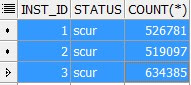
IO_CELL_OFFLOAD_ELGIBLE_BYTES is now 0. And around 26 GB of data has been sent back from the cell server to the database compute node. It was a buffered read, smart scans did not take place. Let's look at V$BH to see if the blocks has been cached across all the RAC instances.

SELECT inst_id, status, COUNT (*)
FROM gv$bh
WHERE objd = 66837983 AND status != 'free'
GROUP BY inst_id, status
ORDER BY 2 DESC


T


These are the number of blocks cached on each of the instances in scur mode.
Adding the number of blocks - 1680263. Multiplied by DB Block size of 16KB- I get 26 GB.
Oracle has now uniformly cached the entire table in the buffer cache of instance 1,2,3. Each instance caches around 8 GB of data blocks. This was done using cell multiblock physical reads (and not via cell smart scans). This explains why this execution took more than 8 minutes. It had to read 25 GB of data from the storage, transfer it to the compute nodes and cache it onto the instance buffer cache. This is certainly an overhead for the first execution.
Now let's run the same SQL again. Hoping that this time, Oracle would read the data from the global buffer cache.

SQL> SELECT /*+ PARALLEL(8) */ COUNT(*) FROM T ;

And yes, second execution of this SQL completes in 1 second. Looking at the stats


No smart scans here as io_cell_offload_eligible_bytes is 0. But disk reads and physical reads  bytes has come down to 0. Because Oracle can now find all the block it needs in the buffer cache of instance 1,2,3. Another important point to note here is that the PX servers do not use cache fusion to transfer blocks between nodes. It is also possible to see one instance doing direct path reads and other instance(s) going for buffered reads. 

To summarise this behaviour, IMPX is not really useful on Exadata environments because it prevents the use of smart scans and storage indexes. Queries that benefits a lot from smart scans will most likely suffer from parallel buffered reads. Moreover, the global database cache is still limited in size, couple of big tables in a warehouse environment can easily fill up 80% of the cache and then Oracle will start to trash the cache. That's again a huge overhead. 
In my opinion, AUTO parallel degree policy is like a beast in the cage. It makes your database vulnerable to IMPX, parallel statement queuing and as a DBA you are never in complete control ! It is best to have the policy set to MANUAL specially for large warehouse databases on Exadata environments.  

Bloom Partition Pruning In Oracle Vs Postgres

In this blog post let's compare Oracle and Postgres optimizer transformation features.  For this test case I created two small tables an...